
Modeling Digital-Age Learning in a Participation Arts Based Classroom (ISTE 3)

ISTE Standard 3 states that teachers should exhibit knowledge, skills, and work processes that are representative of an innovative professional. My content area, theatre arts, is based in human interaction; these interactions must occur in the moment and in person. An actor must learn to act and re-act. Taking the content of theatre arts into the technological realm is equivalent to making painting class into a digital photography class. However, there is a great deal of content that can be delivered in a flipped classroom format; there are digital tools for teachers, students, and actors that are becoming increasingly common place.

Because the world is increasingly tech-enabled and tech-enhanced, how can I as a teacher of theatre arts, demonstrate technological processes that both enhance my curriculum, increase productivity, and build technological capacity in my students?

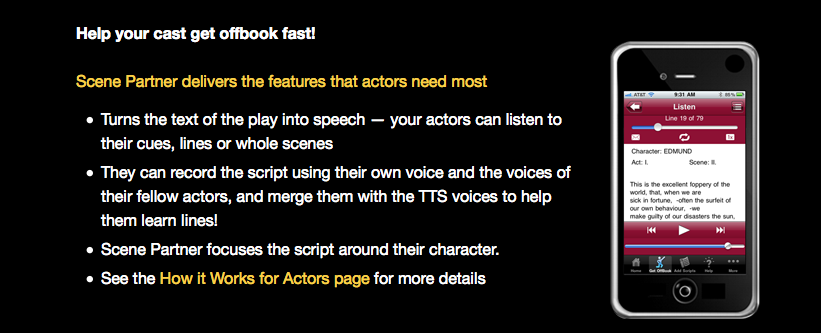
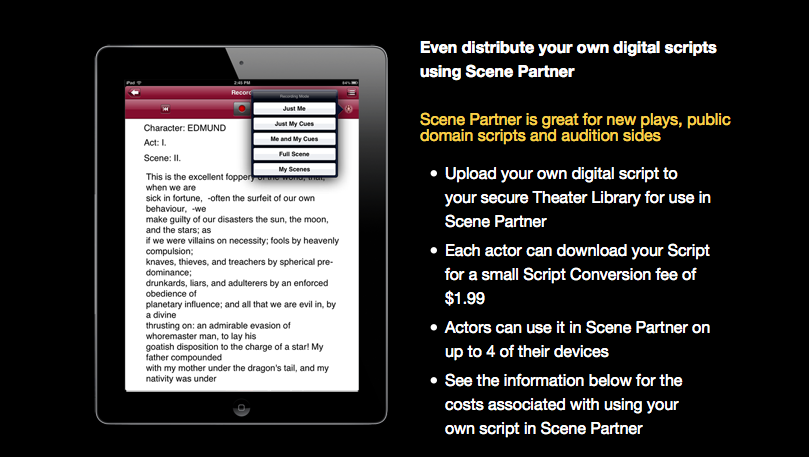
Kennedy (2009) speaks to the need for educators to rethink education and align learning environments with real world demands so that learning is flexible and can be utilized anytime and anywhere. One of the most tedious tasks of the actor is to memorize lines. One digital innovation seeks to change that. ScenePartnerApp (https://www.scenepartnerapp.com/) is one of many emerging tools for actors to use when the need to memorize their lines. Any student with an iDevice can download existing scripts or upload their own. This makes the program highly adaptable to any classroom, especially mine because much of the theatre work that my students engage with is written by the students in my classes. However, when we do get to the published works (such as Shakespeare), we can simply download the text.
Screen Shot 2015-02-14 at 1.45.46 PM Screen Shot 2015-02-14 at 1.46.16 PM Screen Shot 2015-02-14 at 1.46.38 PM

One of the greatest highlights of this app is that it allows the user to hear only their lines or only the lines of their scene partner. This ability to repeat the text and use a digital scene partner is invaluable. Without this, the technique of memorization with a partner would need to happen in class. By using this app many of my students, those with iPods and iPads, have a highly effective solution that not only saves time for my classroom, it adds digital flexibility for my students. This app is one clear example of how I can integrate emerging digital technology into a classroom based on human interaction. In fact, because of the time I save (due to students memorizing their lines outside of class) I can increase the amount of human interaction in my class.

Theatre arts is not alone when it comes to time saving digital tools. Now because of the Google Institute (shared by Lida Enche in Google+) students can save travel time and virtually visit art across the world. This too increases the human interaction because in the classroom, teachers and students can talk as much as they want. Google Institute can be found at, https://www.google.com/culturalinstitute/project/art-project. I encourage everyone to check out both of these new digital tools that help arts classes.

References:

Kennedy, K. (2009). Volume 7, Issue 2 Distance Learning 21 Cross-Reference of Online Teaching Standards and the Development of Quality Teachers for 21st Century Learning Environments. Distance Learning, 7(2), 21-28.

ISTE #2 Teaching With Technology

ISTE QUESTION 2: Given that authentic learning experiences can be powerful and lifelong, how can educators put technology into the hands of the students to personalize their knowledge and demonstrate their understanding; further, how can students use technology for self-assessment (formative or summative)?

I started my question this week with the assumption that self-assessment was valid and effective in the practice of teaching. What I found, to support that assessment was valid, was a study conducted by de la Fuente (2014); a link to the study can be found at http://web.b.ebscohost.com/ehost/command/detail?sid=cd7a458d-96f3-4e94-a3d7-2e1c3fc46da9%40sessionmgr198&vid=26&hid=125. This study compared two types of student assessment in a secondary language classroom. The scenario of students working independently to memorize words and phrases is not too different from a common scenario in the theatre arts classroom. In my work, I often give students time to work on memorizing their lines. The study placed one group of students in a position of control over their self-assessment with mobile assisted language learning (MALL). The second group surrendered all power to the instructor with an assessment that was instructor manipulated language learning (IMLL). The study observed the comprehension of the students following the assessments. Students in the MALL group demonstrated significantly higher levels of comprehension in multiple categories (de la Furente, 2014). When comprehension is the central task, self-assessment is more effective than instructor directed assessment.

Second, I attempted to answer the more difficult question of how to implement self-assessment through technology. A second study was found to answer this question (Mordis and Economides, 2012); the link is provided here http://web.b.ebscohost.com/ehost/pdfviewer/pdfviewer?vid=24&sid=cd7a458d-96f3-4e94-a3d7-2e1c3fc46da9%40sessionmgr198&hid=125. Mordis and Economides (2012) found that during a self assessment test the learner was able to reach an optimal emotional state in relationship to the learning content by giving students the reward of applause after correct responses.

Students took a multiple choice question test and the levels of anxiety were observed and measured. Results showed that male students not receiving applause have a significantly high state of anxiety after the test than female students not receiving the applause (Mordis and Economides, 2012). Further, males that received applause after correct responses were significantly less anxious than females in the same category. In other words, males need more external positive motivation to reduce their anxiety.

Mordis and Economides (2012) conclude that affective feedback during self-assessment is only one tool that can be used; this supportive feedback can have positive or negative outcomes that may fall along gender lines. Lastly, affective teaching must embed self-assessment within the educational context (Mordis and Economides, 2012).

In my classroom, I have students give a “clap of respect” to performers. The clap does not signal success or failure (as the second study did for success). However, this did highlight renewed awareness that every student reacts differently to praise.

What really interested me this week was the idea of self-assessment through technology in an arts classroom. Lida Enche, provided a reference to the tool that could combine my public presentations with technology. By utilizing a document camera, I could have students highlight their own work (e.g. notes they made on their script) and evaluate their progress for the class. The resource provided by Enche (http://www.theartofed.com/2014/09/01/15-fabulous-ways-to-utilize-a-document-camera-in-the-art-room) does not address the concept of self-assessment, however it does lead one to extend ones thinking about how to use the document camera.

References:

de la Fuente, M. J. (2014). Learners' Attention to Input during Focus on Form Listening Tasks: The Role of Mobile Technology in the Second Language Classroom. Computer Assisted Language Learning, 27(3), 261-276.

Moridis, C. N., & Economides, A. A. (2012). Applause as an Achievement-Based Reward during a Computerised Self-Assessment Test. British Journal Of Educational Technology, 43(3), 489-504.

Teaching With Technology

The integration of technology in a classroom can be an effective means to instruction because it can generate creativity along side developing proficiency with technology .

In consideration of ISTE 1 and the practice of drama instruction, learning can happen online – in a flipped classroom setting. The online portion of the learning can deliver content and allow for the classroom time to be focused on the creative aspects of drama. The technology can then also be used to capture the creative expressions of the students.

For example, I can deliver a lecture online about the play format and style.

Continue reading “Teaching With Technology”

ONLINE SURVEY and KWL

Using the KWL model (Know, Want to know, and Learning accomplished) is an effective tool for educators to assess student progress and gauge engagement with the content. A teacher must understand the previous knowledge of each student’s abilities; they must activate the students desire for knowledge based on what the students want to know; the must assess what students have learned. Assessing student knowledge can be cumbersome. With multiple tests, exit tickets, and paper surveys, it can build up on a teacher’s desk and quickly end up in the recycling. Instead, a teacher can effectively integrate technology into the classroom through online surveys; in doing so, students are introduced to the technology that will make their education more simple and efficient (P4).

This year, I started using Google Forms for all of my classes. It is an effective method of collecting (and keeping) student

Continue reading “ONLINE SURVEY and KWL”

ONLINE SURVEY and KWL

Using the KWL model (Know, Want to know, and Learning accomplished) is an effective tool for educators to assess student progress and evaluate engagement with the content. A teacher must understand the previous knowledge of each student’s abilities; they must activate the students desire for knowledge based on what the students want to know; they must assess what students have learned. Assessing student knowledge can be cumbersome. With multiple tests, exit tickets, and paper surveys, it can build up on a teacher’s desk and quickly end up in the recycling. Instead, a teacher can effectively integrate technology into the classroom through online surveys; in doing so, students are introduced to the technology that will make their education more simple and efficient.

This year, I started using Google Forms for all of my classes. It is an effective method of collecting (and keeping) student information. These surveys can serve as pre-assessment tools, formative assessments, and summative tests. Through Google Forms, I can customize the experience. By adding navigation functions from one question to the next, I can send a survey link to every grade level and the survey will sort out the questions that the respondent needs to answer based on their previous responses. This was most helpful when I designed a survey for all students as they prepared for their student conferences. I am also able to limit the number of responses to one per respondent; this means that students cannot retake a test.

With Google forms, I can quickly gather student data on the relevant topic. More importantly, I can access that data anywhere I have an Internet connection. I can easily send out a survey to an entire class, including students that are sick or absent for the day. Now, I no longer need to track down a student that has not completed a survey. I can simply send them an email reminder to complete the work online.

PRE-ASSESSMENT: At the start of the semester, I wanted to know what my eighth grade students knew about Shakespeare. Before we started the unit, I had them take this quick “quiz.”

https://drive.google.com/open?id=1QDW4v-2B0M2iRcUSwqPKpoAGTg8esIhgQen4nF_86KA&authuser=0

I was able to use the results to gage my lessons. At the end of the unit, students will take the same quiz and I will be able to compare the results and assess learning for all students as individuals and as a class.

FORMATIVE WORK: Discovering what the students KNOW and what they WANT to know, I implemented a survey that assessed student progress to date. In the seventh grade, so that I could quickly evaluate each students progress with their playwriting project, I implemented a survey. I used the student laptops so that I could demonstrate the process in class. Each student was able to fill out the form during class time during this first round while I was available to answer any technology questions.

https://drive.google.com/open?id=14hndDn2MEJTz4miOcWkbU4uWXHD56jsij1DhgpH4CfU&authuser=0

In answering the survey, I was able to find what the students wanted to write about (what they wanted to know). I was also able to assess how well they knew the format that I wanted them to use (what the knew).

SUMMATIVE WORK: Here I used the survey tool as a summative assessment. This is the third portion to a state standards test for Drama in Pantomime (what they learned). Students had to respond to a performance they presented in class the day prior.

https://drive.google.com/open?id=1xNAAo4gTekec3z5Bby_dM1FZYFor2RNWoI-oxrlUFB4&authuser=1

One may have a concern about the ‘take-home-test.’ However, in this case, there is no information that the student can look up on the Internet that will help them. There are no notes that they may have that will give them the answers to the questions and students must use their class materials to complete the test. When the take-home-test is an option, the survey format is excellent.

In summary, I have seen a great deal of benefit in efficiency and student buy in with the online survey. Students see it as “cool” that they get to do homework online and I am able to keep all the responses without any additional paperwork. I aim to further my pursuits in online survey work.

There were a small handful of students that do not have Internet access at their homes. However, students are able to access their email accounts at school. Because of this, I allow multiple days for the completion of the survey so that students can access the form from school.

In future versions of the online form, I will be sure to make the directions clear in the answer (e.g. select two answers). In one form I created, many students gave me the feedback that the form was confusing due to one question where the requirement to select two answers was unclear.

Because of the success of Google forms and Google docs, I aim to integrate Google Presentations into my classroom next. I envision a project that requires multiple students to collaborate into a single presentation.

Planning for Instruction

To improve as a teacher, one must reflect upon their progress, plan for future instruction, and adapt standards that are uniform across classes while allowing for the diverse needs of each student (P1). I have and will continue to do this in my teaching practice (E1).

It is interesting to think about teaching as a practice. It is never something that is perfected – it is practiced. Like medicine or an instrument it must be a continual activity where the practitioner improves and changes over time.

At the beginning of the summer, I made very general comments about lesson plans as I reflected on my past experience in the classroom. I stated, “At a basic level, lesson plans are a guide for the class. Lesson plans help to prepare for and to teach a class. A clear plan will help students understand the purpose, learning goals, and content.” I still stand by what I said. Continue reading “Planning for Instruction”

Students in a Plural World

Students deserve an education they can easily access. It should be of the highest possible quality, developmentally appropriate, and stretch the learning into proximal development. Student learning happens best across language barriers and ability levels.

John Medina writes on the value of Multimedia presentations. In the book, “Brain Rules (2008)” he cites five rules for multi-media teaching. These rules offer a memory boost to students because they engage the student across language land earning abilities. Their application to Theatre Arts or English Language Arts is immediate and necessary.

Rule One, Multimedia Principle. Application: Have students create maps of their learning. Students learn from words and pictures together. Students should map their knowledge. When they do this they are creating a framework for present knowledge and future knowledge organized into nodes of learning.

Rule Two, Temporal Contiguity Principle. Application: present a concept map or picture that has text integrated into the image. For drama or ELA, this can be done with a storyboard. The storyboard can pre-view the chapter or entire story. The storyboard can include images of major characters and places that they go along with character relationships, such as family relationships.

Rule Three, Spatial Contiguity Principle. Application: Words need to be presented near the image. For a theatre classroom, all the equipment, costumes, and props, can have labels that both help to organize the room and instruct students about what they are as they passively observe the room.

Continue reading “Students in a Plural World”